
LIVE SESSION
THE VIRTUAL IQ CLASS ROOM
The disappearing 4-patch quilt challenge
Monday, 24 November 2025
09:00 AM ACDT
Your session has expired.
IQ Pro Skills for Custom Centers & Pantograph Framing
2 choices on how to join in!
Subscribers to IQ Summit or Gold member group:
Login to the website and look for this course in your 'My Courses' page and go to the first lesson to register for the live Zoom session. Once we have completed the live presentation the replay and extra content will be available in the course for you to watch at your leisure. Being with us LIVE however, will get your questions answered immediately.
🚀 Stop Settling for Basic Quilting! Master the No-Sew Zone & IQ's Advanced Custom Tools
The IntelliQuilter Advanced Design Course: From Pantograph to Perfection
Are you an Intelliquilter owner ready to tackle the projects that truly stand out? This course is your fast-track to mastering the complex, professional techniques required for custom quilting high-focus areas without breaking the bank. This course is designed to transition you from "just loading a pantograph" to confidently controlling every detail of your quilting design.
🤯 Your Enrollment Includes...
This isn't just a course; it's a complete project package that gives you the skills and the materials to start immediately!
Purchase the LIVE class only and you will receive:
1. The Expert IQ Design Training
Unlock advanced skills that other quilters charge premium prices for:
- Defining and Working with a No-Sew Zone:
Learn the precise method to reserve a central area for custom quilting, ensuring your pantograph stops exactly where you want it to. - Precision Pattern Distortion:
Master the editing tools to nudge, skew, shape shift and distort designs, making them fit perfectly into challenging, irregular shapes inside your custom area. - The "Create a Block" Secret:
Learn the high-level technique of marking a shape on the quilt and turning it into a custom, repeatable IQ pattern. - Advanced Framing & Echoing:
Use your custom block to beautifully echo and frame your centerpiece design, giving your quilt professional depth and definition.
2. The Complete Queen Quilt Piecing Pattern (A $15 Value, FREE!) if you purchase the course!
You'll receive the full, digital piecing instructions for the Oversized Disappearing 4-Patch Queen Quilt—the ideal canvas for our course:
- Fabric Requirements & Yardage
- Quick-Cut Instructions:
Efficient cutting tips for fast assembly with no fabric wastage. - Disappearing 4-Patch Piecing Tips:
Shortcuts and best practices for creating this beautiful, oversized top quickly.
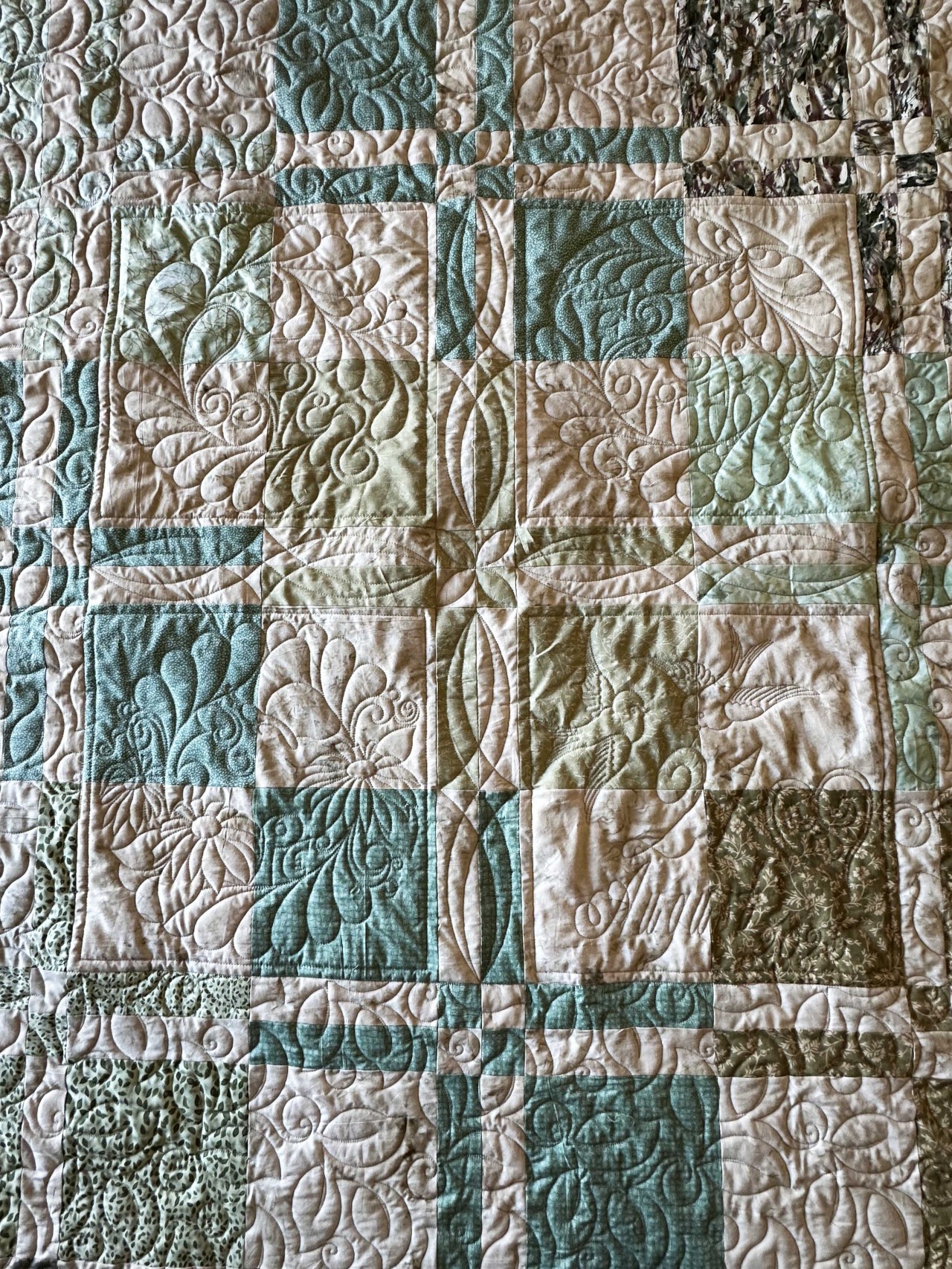
Stop watching others create masterpieces and start creating your own. This entire project, including the comprehensive pattern and the expert IQ training, is available now.
Don't miss this opportunity to acquire high-level Intelliquilter skills for the cost of lunch!
Click Below to Enroll and Download Your Quilt Pattern Now! [YES! I WANT TO MASTER THE NO-SEW ZONE FOR ONLY $30!]
Anyone can make this quilt quickly and just get it done ready to experiment with quilting designs!
The automation training is tailored specifically for Intelliquilter users, so you're learning techniques that directly apply to your machine. Plus, we've got step-by-step video tutorials showing you how to achieve no sew zones that don't fit into your throat space plus simple ways to custom quilt that no sew zone.
And honestly, we're all about encouragement here. We want you to feel confident and inspired to create beautiful things, so you'll find a really supportive and friendly vibe throughout the whole course.
Course includes:
- Step-by-Step Videos:
Detailed video lessons walk you through each stage of the process. - Full pattern with fabric requirements, cutting and piecing instructions to make your own Queen sized quilt top ready to quilt.
- Hands-On Learning:
Follow along as you design, plan, and edit your way to stunning unique pantographs with a featured custom centre larger than your throat space. - Exclusive Tips & Techniques:
Learn handy tips for creating custom patterns in the No Sew Zone, using the tools at our fingertips. - Live Q&A Session:
Get your burning questions answered by our expert instructor during the interactive live session. - Lifetime Access:
(if you purchase the course & not just the LIVE session)
Revisit the lessons anytime, with lifetime access to the course materials with bonus patterns to download. - Exclusive Community Access:
(for IQ Summit and Gold member subscribers) Connect with fellow quilters, share your creations, and receive ongoing support
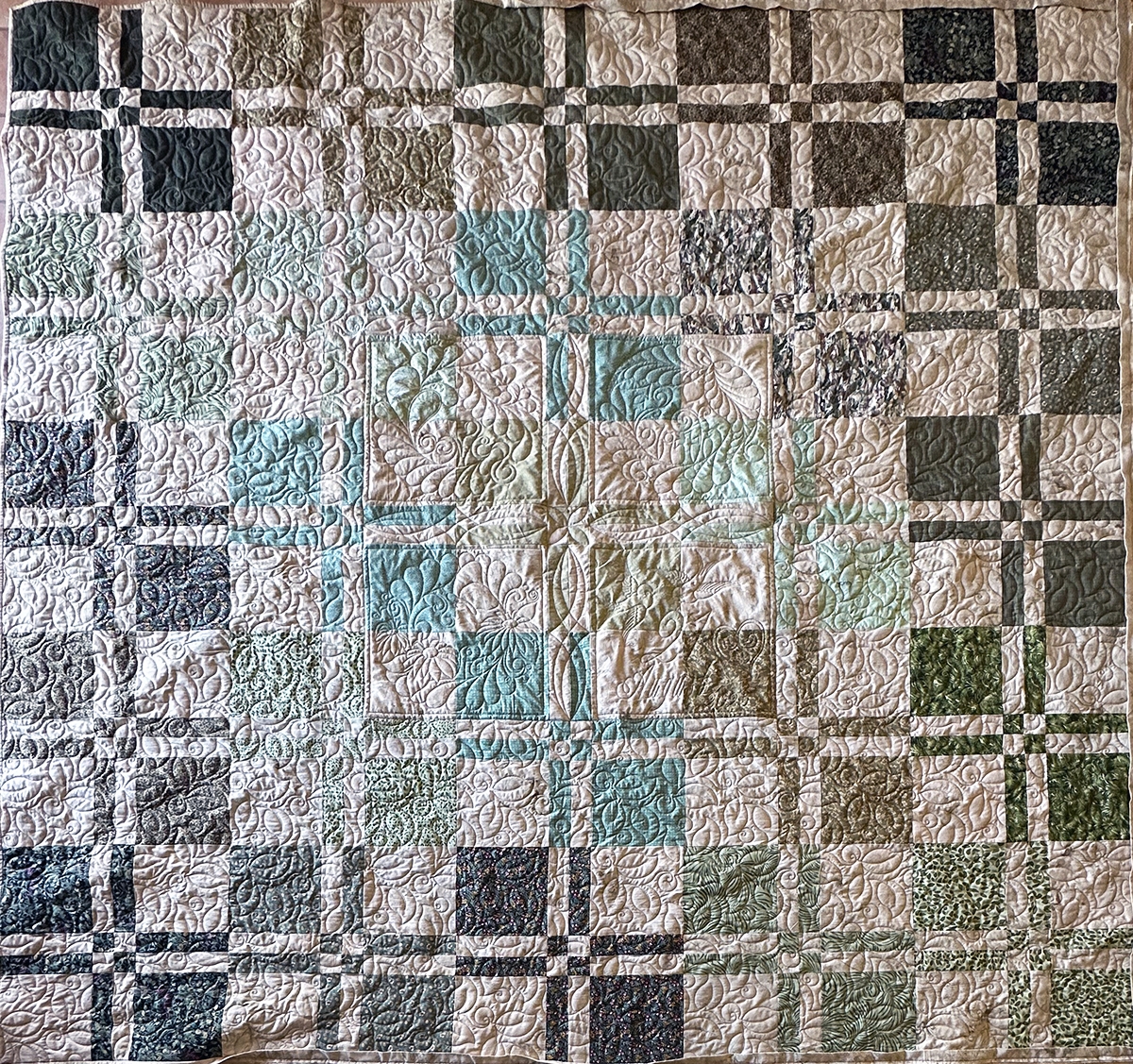
🎯 Course Learning Objectives
- Quilt Setup & Preparation
-Accurately prepare and load a Queen-sized quilt top (using the provided Disappearing 4-Patch pattern) onto the quilting frame.
-Understand the purpose and application of an oversized piecing method for efficient quilt assembly. - Advanced Pattern Design & Placement
-Define and utilize the No-Sew Zone tool within Intelliquilter to reserve a central area for custom work, protecting it from the main pantograph.
-Precisely size and position a main pantograph design to run seamlessly across the entire quilt, respecting the defined no-sew boundaries.
-Understanding transitions around the No Sew Zone area and making informed choices. - Custom Block Creation & Framing
-Execute the "Create a Block by Marking on Quilt" feature to accurately capture the shape of a design space.
-Save the measured shape as a reusable custom pattern or block.
-Apply advanced editing techniques (e.g., Echoing and choosing start/stop location for improved stitch out) to use the custom block as a framing element around the central design area. - Editing, Distortion, and Fitting
-Import and manage multiple custom quilting designs intended for the no-sew zone.
-Utilize the editing tools (including Move, Rotate, Mirror, Split and Size) to position designs perfectly within specific, spaces.
-Apply the Distortion and Shape Shift Tools to manipulate the shape of the custom designs, ensuring they fit tight or unusually shaped areas accurately and aesthetically. - Workflow & Efficiency
-Develop a reliable step-by-step workflow for integrating both large-scale pantographs and intricate custom work on a single project.
-Demonstrate proficiency in saving, loading, and segmenting complex design layouts for flawless execution.
This live class is designed for experienced beginners to Advanced longarm quilters who own and operate an Intelliquilter (iQ) system. It is specifically aimed at those who want to move on from only pantograph quilting.
It does NOT include the pdf pattern with fabric requirements, cutting and piecing instructions.

What we Promise!
Expert Instruction
Presenters are all experts in their field with proven results from extensive experience
Fun and Engaging Sessions
Sessions will be made up of any or all of the following
-live webinars
-Powerpoint presentations
-video training and/or downloadable notes
Utmost satisfaction:
Every speaker at the Summit is giving her/his best! We will interview each speaker personally and ask the right questions so you get the answers you need to fully understand the featured technique.

Live Training
By Your Host Tracey Browning
For more than three decades, Tracey has been deeply involved in the world of quilting, gathering a wealth of experience that she's excited to share with you. She started as a quilt teacher, helping others learn the craft. As a quilt and pattern designer, her creations found their way into magazines and books, showcasing her artistic flair. Later, Tracey embraced longarm machine quilting, turning ordinary fabrics into intricate masterpieces. She became the Australian Dealer for A1 Quilting machines, bringing cutting-edge technology to quilting enthusiasts in Australia. Additionally, she dove into Intelliquilter computer systems, mastering the blend of technology and textiles.
One of Tracey's proudest achievements was creating the Australian Machine Quilting Festival, a special event dedicated to educating machine quilters. For a decade, this festival provided a unique platform for learning and community-building.
Above all, Tracey is known for her unwavering support and mentorship. Her customers have always appreciated her dedication to helping them learn and grow in their quilting journey. With Tracey by your side, you're not just learning a craft; you're embarking on an adventure with a seasoned expert who's eager to guide you every step of the way.
FREQUENTLY ASKED QUESTIONS
What Intelliquilter features must I have?
To complete this workflow, your iQ system must support the ability to define Block Patterns, set No-Sew Zones, utilize Mark on Quilt for accurate mapping, and customize Stitching Sequences and Transitions. These are standard features in most modern iQ systems.
I'm new to iQ. Can I take this course?
We recommend you are comfortable with basic iQ operations (loading digital patterns, setting up a standard pantograph, and general machine movement) before enrolling. This course focuses on building your skills with simple quilting.
Do I need special digital patterns?
No, any standard digital pantograph file compatible with iQ (e.g., .IQP, CQP, DXF) will work. The course focuses on using iQ's powerful tools to adapt and manage your existing pattern library.
What if I get stuck or have questions?
Your purchase of the course includes lifetime access to the course and dedicated Q&A support within the course platform. You can post your questions directly to the instructor and the community. However, if you have only purchased the LIVE class portion, then you must attend LIVE to have any questions answered during that live class.